Start with a universal wishlist app, add several items with full metadata (brand, SKU, colorway, size, price, retailer URL), tag each as a “need” or “want,” set price and restock alerts, then schedule a monthly audit to move items into your purchase queue. That’s the complete designer wishlist creation guide in one sentence. Here’s how to execute it in under 20 minutes:
- Pick a universal wishlist app (GiftList, MyRegistry, or WishGiven work well for multi-retailer designer shopping).
- Create two lists: one labeled “Needs” and one labeled “Wants.”
- Add your first several items with full metadata: product name, brand, SKU, colorway, size, retailer URL, and current price.
- Set a price-drop alert for every item over $500.
- Share the list with your personal shopper or gift-givers, adjusting privacy settings as needed.
For a single-retailer habit (say, you shop mostly at one boutique), a retailer wishlist works fine. For multi-brand designer shopping across Gucci, Chanel, Prada, and Balenciaga, a universal app is the smarter move. If you work with a personal shopper, the wishlist serves as your briefing document.
Key Takeaways
A metadata-rich wishlist with price alerts, priority tags, and a monthly audit routine is the most reliable system for converting designer interest into authenticated purchases.
| Point | Details |
|---|---|
| Metadata is non-negotiable | Every item needs brand, SKU, colorway, size, retailer URL, and a “why” note to be useful for personal shoppers and authentication. |
| Two-list structure works best | Separate “Needs” from “Wants” and maintain a lean “Purchase Queue” for items budgeted within 60 days. |
| Price alerts drive smart timing | Set alerts at 10–15% below retail so you act on genuine drops rather than impulse. |
| Monthly audits keep lists active | Prune stale links, archive items you haven’t considered in 60 days, and move budgeted items to the purchase queue. |
| Naiseshopper closes the loop | Use Naiseshopper’s authenticated inventory and personal shopper service to convert wishlist items into verified purchases with shipping insurance. |
Table of Contents
- Why does a dedicated designer wishlist matter?
- What every effective designer wishlist must include
- How do you choose the right wishlist platform for designer items?
- Step-by-step setup and ongoing management workflow
- Which wishlist apps work best for designer shopping?
- How to turn your wishlist into a real procurement pipeline
- Common mistakes that kill a good wishlist
- The wishlist is only as good as the habit behind it
- Naiseshopper makes wishlist-driven buying straightforward
- Sources
Why does a dedicated designer wishlist matter?
A wishlist built specifically for luxury purchases does more than save links. It becomes a living procurement tool that protects you from bad buys, missed restocks, and authentication oversights.
- Purchase planning: Tracking prices over time reveals whether a piece is appreciating or discounting, which directly informs when to buy. Wishlist features improve customer engagement and conversion and generate preference data that helps you make smarter decisions.
- Gift registry: A structured list with priorities and price tiers makes it easy for friends and family to choose confidently. Curated gift guides for design lovers show how tiered picks across budgets make gifting feel intentional rather than random.
- Personal shopper briefing: A metadata-rich wishlist hands your stylist everything they need to source alternatives, verify stock, and confirm authenticity without a back-and-forth email chain.
- Group gifting: High-ticket items like a Gucci G-Timeless watch become accessible when a group can contribute toward a single piece.
- Resale and timing decisions: Tracking a piece’s price history helps you decide whether to buy now, wait for a seasonal promotion, or flip a pre-owned version.
- Authentication risk reduction: Saving the authorized retailer URL alongside the item creates a paper trail that protects you from counterfeit sources when you’re ready to buy.
Packaged designer gift sets illustrate how curated, presentation-ready products can anchor a shared wishlist, giving gift-givers a clear, confident path to checkout.
What every effective designer wishlist must include
The difference between a wishlist that converts and one that collects dust is metadata. A saved link alone tells you almost nothing six months later.
Required fields for every item:
- Product name and brand (e.g., “Prada Re-Edition 2005 Saffiano Mini Bag”)
- SKU or model number (critical for authentication and personal shopper sourcing)
- Preferred colorway and hardware finish (e.g., black with gold hardware)
- Size or dimensions
- Retailer URL pointing to an authorized seller
- Current price and currency
- Product image (screenshot or saved photo)
- Date added
- Priority tag: “Need” or “Want”
- A short “why” note (e.g., “completes my capsule wardrobe; open to re-edition versions”)
Organizational structure: Keep two separate lists. Your “Needs” list holds pieces that fill a genuine gap in your wardrobe or collection. Your “Wants” list holds aspirational items. Within each list, sort items by price tiers ranging from lower to higher price points. A purchase queue is a third, smaller list for items you’ve budgeted for and plan to buy within 30–60 days.
Sharing and privacy: Most universal apps let you toggle between private, shared-with-link, and public. For gift registries, shared-with-link is the right setting. For personal shopper briefings, private with a direct share keeps your preferences confidential.
Sample item template you can copy into any note field:
Brand: Saint Laurent | Item: Loulou Small Bag | SKU: 494699 | Color: Black matelassé | Hardware: Gold | Size: Small | Retailer: YSL.com | Price: $1,750 | Added: March 2026 | Priority: Need | Why: Everyday crossbody; open to pre-owned authenticated versions
E-commerce wishlist best practices consistently show that confirmation on add, easy removal, and visible placement reduce friction and increase reuse. Apply the same logic to your personal list: make it fast to add, easy to prune, and always visible in your daily workflow.
Pro Tip: The “why” field is your most underrated asset. When you hand your list to a personal shopper or authenticator, that note tells them exactly what you’re after and gives them room to suggest alternatives. “Open to pre-owned authenticated versions” can unlock a much wider inventory.
How do you choose the right wishlist platform for designer items?
The platform decision comes down to one question: are you shopping across multiple retailers, or do you live inside one ecosystem? Wishlist UX patterns break into three dominant models: a grid with quick-add-to-cart, a public shared wishlist with social features, and a registry-style list with priorities and contribution options. Each fits a different buyer type.
Feature checklist to evaluate any platform:
- Universal store integration (can you add items from any retailer via a browser extension?)
- Browser extension for desktop and mobile
- iOS and Android apps
- Price tracking and drop alerts
- Stock and restock notifications
- Sharing options with privacy controls (private, link-only, public)
- Group-gifting or contribution features
- Export or backup capability
Decision guidelines:
- Universal wishlist app: Best when you shop across Gucci, Chanel, Bottega Veneta, and independent boutiques. A browser extension lets you save from any site in seconds.
- Retailer wishlist: Best when you concentrate purchases at one brand’s site. Faster to use, but siloed. No cross-brand price comparison.
- Personal shopper integration: Best for hard-to-find pieces, international sourcing, or authenticated pre-owned. Your wishlist becomes the briefing document. Platform setup documentation confirms that a product-page wishlist button and an account-area management section are the two non-negotiable technical components any platform needs.
Matching platform to buyer type:
- Collector: Prioritize price tracking, restock alerts, and export. GiftList or WishGiven.
- Gift registry: Prioritize sharing controls, contribution features, and a clean public view. MyRegistry or Giftster.
- Opportunistic buyer: Prioritize price-drop alerts and browser extension speed. Amazon Wishlist or GiftWhale.
- Personal-shopper client: Prioritize metadata export and private sharing. Any universal app with a shareable link.
Step-by-step setup and ongoing management workflow
Initial setup (20 minutes)
- Choose your platform based on the criteria above. Install the browser extension immediately.
- Create two lists: “Needs” and “Wants.” Add a third called “Purchase Queue” for items you’re actively budgeting.
- Add 10–15 starter items with full metadata using the template from Section 3. Don’t skip the SKU or the “why” note.
- Tag each item as Need or Want, and assign a price tier.
- Set price alerts for every item over $500. Most universal apps have this built in; if yours doesn’t, use a browser extension like Honey or a retailer’s own alert feature.
- Enable restock notifications where available, especially for limited-edition or sold-out pieces.
- Configure sharing settings. Private for personal use, shared-with-link for personal shoppers, public only for inspiration boards.
- Add authenticity notes for high-ticket items: authorized retailer URL, model number, and any provenance details you already have.
Ongoing maintenance routine
Audit your wishlist every two to four weeks. The goal is to keep it lean and current, not comprehensive. Here’s what to check:
- Move to purchase queue: Any item you’ve budgeted for in the next 30–60 days moves here.
- Archive dead links: Retailer URLs break. Replace them or remove the item.
- Update prices: A piece that dropped 20% may have crossed into your budget range.
- Prune the “Wants” list: If you haven’t thought about an item in 60 days, archive it.
- Add new notes: If you’ve seen a piece in person or learned more about its sizing, update the note field.
Budget integration
Add a “target price” field and a “payment timeline” note to each item. For pieces over $2,000, note whether you’re planning a lump-sum purchase, a layaway option, or a group-gifting contribution. Linking your wishlist to a simple budget tracker (even a spreadsheet) gives you a clear picture of your total committed spend. For authentic designer deals, knowing your budget ceiling before a price drop hits is what separates a smart buy from an impulsive one.
Authenticity capture checklist for high-ticket items:
- Authorized retailer URL (not a third-party marketplace listing)
- SKU or model number from the brand’s official site
- Serial number format (so you know what to verify at purchase)
- Notes on known counterfeit tells for that specific model
- Provenance notes if pre-owned (previous owner, purchase receipt, authentication card)
When the alert fires, don’t buy immediately. Cross-check the retailer’s authenticity credentials first, then move the item to your purchase queue with a 48-hour decision window. That pause eliminates most impulsive buys while keeping you fast enough to act on genuine deals.*
Which wishlist apps work best for designer shopping?
Industry reporting shows major wishlist apps had notable usage spikes in 2025 tied to feature rollouts and seasonal demand, which means the category is actively improving. Here’s a practical shortlist of the seven most relevant platforms for designer shoppers.
The shortlist
- GiftList — Best for collectors who want a clean, private list with strong metadata fields. Universal integration via browser extension. Excellent for personal-shopper briefings.
- Amazon Wishlist — Best for opportunistic buyers who mix designer with non-designer purchases. Fast to use, widely recognized by gift-givers, but limited to Amazon’s ecosystem for direct purchase.
- MyRegistry — Best for gift registries across multiple retailers. Strong sharing and contribution features. Works well for a wedding or milestone gift list that includes designer pieces.
- Giftster — Best for family and group gifting. Privacy controls are solid; group members can claim items to avoid duplicates. Less focused on luxury-specific metadata.
- Elfster — Best for organized gift exchanges (Secret Santa, group events). Built-in exchange management. Not ideal for solo collector use, but strong for seasonal designer gift lists.
- WishGiven — Best for shoppers who want a visually curated, shareable list. Good universal integration and a clean public view. Works well for inspiration-board-style wishlists.
- GiftWhale — Best for price-conscious buyers tracking deals across retailers. Price comparison features make it useful for timing purchases on designer items that appear across multiple platforms.
Selection tip: If you’re a collector or work with a personal shopper, GiftList’s metadata depth and private-sharing make it the strongest choice. For a gift registry that includes designer pieces alongside home goods, MyRegistry handles the multi-retailer complexity cleanly. Opportunistic buyers who want speed over depth will find Amazon Wishlist’s one-click add hard to beat, even with its ecosystem limitations.
How to turn your wishlist into a real procurement pipeline
A wishlist that stays passive is just a mood board. The collectors who consistently secure hard-to-find Bottega Veneta pieces or limited Saint Laurent drops treat their lists as active procurement tools.
Handing your wishlist to a personal shopper
- Export or share your list with full metadata visible: model number, colorway, hardware finish, size, authorized retailer URL, and your budget ceiling.
- Add a priority tag so your shopper knows whether to act immediately or monitor.
- Include your “why” note. A shopper who knows you want the Loulou Small for everyday use can suggest a pre-owned authenticated version at 30% below retail.
- Specify authentication requirements: new-with-tags only, or open to pre-owned with authentication card and serial number.
- Set a response window. Tell your shopper whether you want options within 48 hours or are comfortable with a two-week sourcing window.
Your luxury personal shopping workflow becomes dramatically more efficient when the shopper receives a structured list rather than a verbal description.
Monitoring for restocks and price drops
Rare designer pieces restock unpredictably. Set restock alerts on the brand’s official site and on any authenticated resale platforms you trust. For seasonal promotions, note the brand’s typical sale calendar in your wishlist (Chanel rarely discounts; Prada and Valentino have more predictable seasonal events). Checking platforms like SPRITZ™ during promotional periods can surface deals on pieces already on your list.
Authentication checkpoints when adding items:
- Flag whether the retailer is brand-authorized or a third-party reseller.
- Note the serial number format for that model so you can verify it at purchase.
- Record any known authentication tells (e.g., Chanel’s hologram sticker placement, Gucci’s serial number location inside the bag).
- For pre-owned pieces, note whether an authentication card, dust bag, and original receipt are expected.
For guidance on choosing authentic designer accessories, cross-referencing serial numbers and authorized retailer status before adding an item to your list is the single most effective counterfeit prevention step.
Pro Tip: Keep your colorway and hardware preferences flexible where you genuinely don’t have a strong opinion. Listing “black or tan, gold or silver hardware” instead of “black, gold only” can triple the number of authenticated pieces your shopper can source, especially during restocks and end-of-season promotions.

Common mistakes that kill a good wishlist
The most common failure mode is treating a wishlist as a permanent archive. A list with 200 items and no priorities is harder to act on than a blank page.
Mistakes to avoid:
- No SKU or model number: Without it, your personal shopper can’t verify authenticity or source alternatives. A product name alone is ambiguous.
- Missing price alerts: If you’re not monitoring price changes, you’re relying on luck to catch a deal.
- No priority tags: Everything at the same priority level means nothing gets bought.
- Stale links: A broken URL is a dead item. Audit links every month.
- Public list with sensitive preferences: Sharing your full wishlist publicly exposes your style preferences and budget range. Use link-only sharing for personal shoppers.
- Treating “Wants” as “Needs”: Mixing aspirational pieces with genuine gaps in your wardrobe leads to impulsive purchases of fleeting trends.
You’ll typically end up with 8–12 active items, which is a workable, focused list.
Pro Tip: Tag each item with a purchase window: “Now,” “3 months,” or “6+ months.” Review the “Now” items weekly and the others monthly. This single habit keeps your list from becoming a parking lot and turns it into a real buying calendar.
For inspiration on luxury fashion wishlist items worth prioritizing, focusing on pieces with strong resale value and timeless design keeps your list aligned to long-term collection goals rather than seasonal impulses.
The wishlist is only as good as the habit behind it
Most luxury shoppers build a wishlist once and never touch it again. That’s the gap between collectors who consistently find what they want at the right price and everyone else.
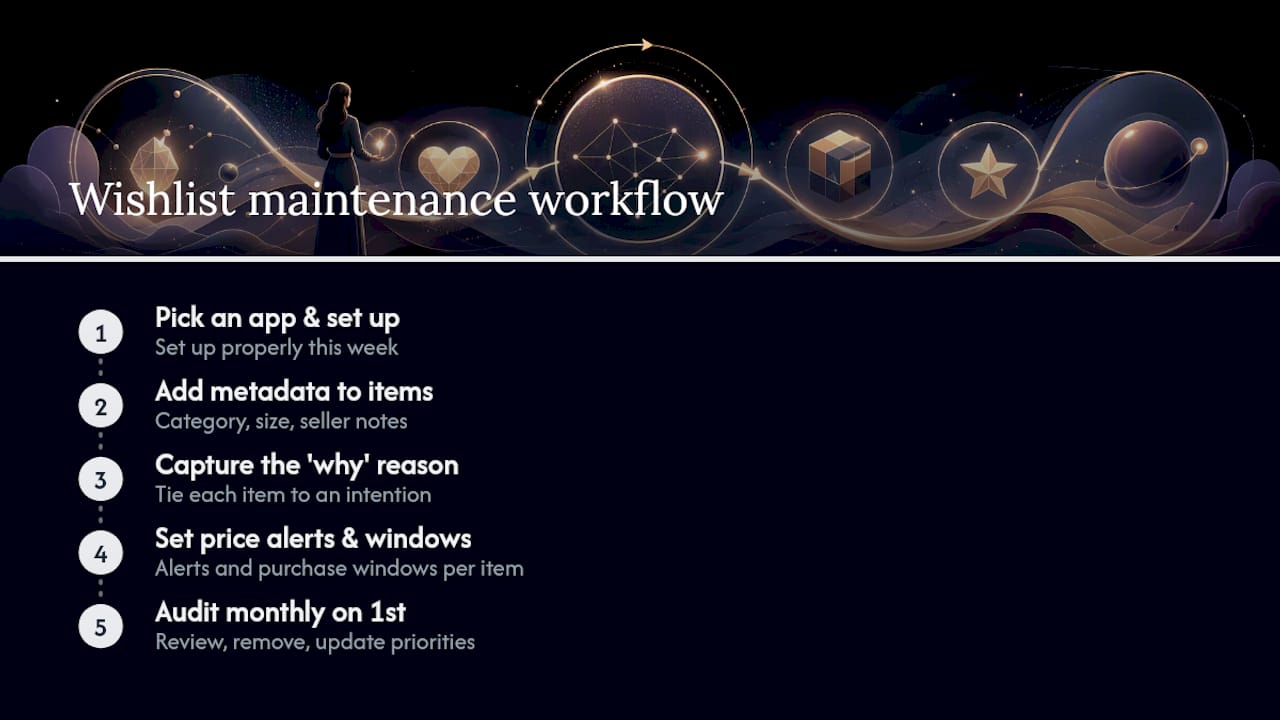
The workflow in this guide works because it treats the wishlist as a living document, not a static list. Metadata makes it useful for personal shoppers. Price alerts make it proactive. Monthly audits keep it honest. And the “why” field keeps every item connected to a real intention rather than a passing trend.
For long-term collectors, the wishlist is a market-monitoring tool. For opportunistic buyers, it’s a deal-capture system. For gift-givers and registry creators, it’s a communication tool that eliminates guesswork. The platform matters less than the habit. Pick one app, set it up properly this week, and audit it on the first of every month.
Naiseshopper makes wishlist-driven buying straightforward
Wishlist apps help you track and organize. Naiseshopper is where the purchase actually happens, with authenticated inventory, deep discounts, and a personal shopper service that can source pieces directly from your list.
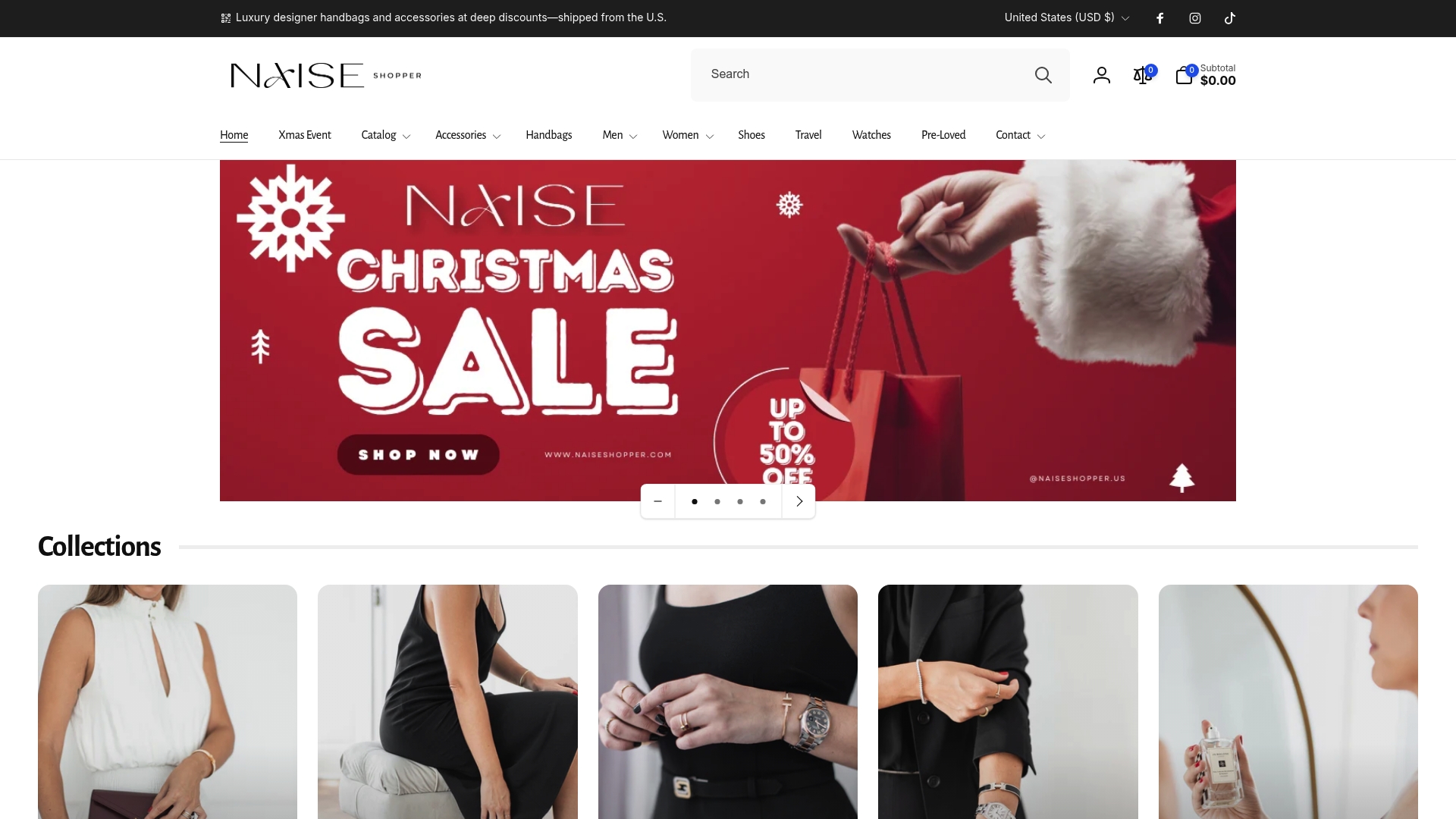
Here’s how the workflow connects: add your priority items to your wishlist with full metadata, then bring that list to Naiseshopper. The personal shopper team can match your wishlist items to authenticated inventory across Gucci, Chanel, Prada, Valentino, Bottega Veneta, Saint Laurent, and Balenciaga, confirm authenticity, and walk you through checkout with localized pricing and flexible payment options. Shipping insurance covers every order. For a high-ticket piece like Dior Black Leather Oxfords or Alexander McQueen Gray Leather Boots, that authentication guarantee is the difference between a confident purchase and a costly mistake. Browse the current authenticated collection at Naiseshopper and bring your wishlist.
Sources
- GoWish’s shopping-and-wishlist app is having its biggest year yet
- Use These E-Commerce Wishlist Examples to Increase Revenue
- IIDA gift guide: 29 gifts for design lovers
- Creating an Effective Wishlist Feature for Your eCommerce Store
- Frank Lloyd Wright Gift Set product page